Saturday, June 16, 2012

Some sorting methods in C

BubbleSort

#include<stdio.h>
int main()
{
int i,j,t,a[]={3,9,7,1,4},n=5;
for(i=0;i<=(n-2);i++)
for(j=0;j<5-i-1;j++)
{ if(a[j]>a[j+1])
  {t=a[j];
   a[j]=a[j+1];
   a[j+1]=t;
  }
}
for(i=0;i<5;i++)
printf("%d,",a[i]);
return(0);
}


CountingSort

#include<stdio.h>
int main()
{
int i,t,a[]={8,7,4,1,0,5,9,2},b[]={0,0,0,0,0,0,0,0,0,0},j,k=0;
for(i=0;i<8;i++)
printf("%d,",a[i]);
printf("\n\n");
for(i=0;i<8;i++)
{ t=a[i];
  b[t]=b[t]+1;
}
for(i=0;i<10;i++)
printf("%d,",b[i]);
printf("\n\n");
for(i=0;i<10;i++)
{ if(b[i]==0)
  continue;
  t=b[i];
  for(j=0;j<t;j++)
  {a[k]=i;
   k++;
  }
}
for(i=0;i<8;i++)
printf("%d,",a[i]);
printf("\n\n");
/*Time complexity 3n*/
return(0);
}


HeapSort

#include<stdio.h>
int main()
{
int i,a[]={0,68,-7,45,6,57},n=6,t,k,l;
int b[n+1];
int left,right,pos,j,parent;

for(i=0;i<6;i++)
{
b[i+1]=a[i];
j=i+1;
while(1)
{
parent=j/2;
if(parent<1)
break;
if(b[parent]>=b[j])
break;
t=b[parent];
b[parent]=b[j];
b[j]=t;
j=parent;
}
}
for(i=1;i<7;i++)
printf("%d,",b[i]);
printf("\n\n");


for(i=1;i<=n;i++)
{
a[n-i]=b[1];
l=n-i+1;
b[1]=b[l];
l--;
j=1;
while(1)
{
left=2*j;
right=2*j+1;
if(left>l)
break;
if(right>l)
{
if(b[j]>b[left])
break;
t=b[j];
b[j]=b[left];
b[left]=t;
break;
}
if(b[left]>b[right])
pos=left;
else
pos=right;
if(b[j]>b[pos])
break;
t=b[pos];
b[pos]=b[j];
b[j]=t;
j=pos;
}
}

for(i=0;i<6;i++)
printf("%d,",a[i]);
printf("\n\n");

/*Time complexity nlog(base 2)n*/
/*For Quick and Merge too.*/
return(0);
}
InsertionSort

#include<stdio.h>
int main()
{

int i,j,t,a[]={5,9,3,0,1},n=5;
for(i=0;i<=n-2;i++)
{
  if(a[i]<=a[i+1])
  continue;
 
  j=i+1;
  t=a[j];
  while(j>=1 && a[j-1]>t)
  { a[j]=a[j-1];
    j--;
  }
  a[j]=t;
}
for(i=0;i<n;i++)
printf("%d,",a[i]);
return(0);
}

MergeSort

#include<stdio.h>

void mergesort(int a[],int left,int right);
void main()
{
int i;
int a[]={9,6,8,2,5,90,-8,4,1,10};
mergesort(a,0,9);
for(i=0;i<10;i++)
printf("%d,",a[i]);
printf("\n\n");
}
void mergesort(int a[],int left,int right)
{
int c[10];
int p,mid,i,j,k;
if(left>=right)
return;
mid=(left+right)/2;
mergesort(a,left,mid);
mergesort(a,mid+1,right);
i=left;
j=mid+1;
k=0;
while(i<=mid && j<=right)
{
if(a[i]<=a[j])
{
c[k]=a[i];
i++;
}
else
{
c[k]=a[j];
j++;
}
k++;
}
if(i<=mid)
for(p=i;p<=mid;p++)
{
c[k]=a[p];
k++;
}
else
for(p=j;p<=right;p++)
{
c[k]=a[p];
k++;
}

for(i=left;i<=right;i++)
a[i]=c[i-left];


printf("\nleft=%d  right=%d\n",left,right);

for(i=0;i<10;i++)
printf("%d,",a[i]);
printf("\n\n");
}
QuickSort

#include<stdio.h>
void quicksort(int a[],int left,int right);
int main()
{
int i,fp,pivot,t,a[]={9,1,17,3,10,-8,5},n=7;
quicksort(a,0,n-1);
for(i=0;i<n;i++)
printf("%d,",a[i]);
return(0);
}
void quicksort(int a[],int left,int right)
{
int i,fp,pivot,t;
if(left>=right)
return;
fp=left;
pivot=a[left];

for(i=left + 1;i<=right;i++)
{
if(a[i]>=pivot)
continue;

fp++;
t=a[i];
a[i]=a[fp];
a[fp]=t;

}
t=a[fp];
a[fp]=pivot;
a[left]=t;
quicksort(a,left,fp-1);
quicksort(a,fp+1,right);
}
SelecionSort

#include<stdio.h>
int main()
{
int i,j,smallpos,a[]={3,9,7,1,4},t;
for(i=0;i<1;i++)
{
  smallpos=i;
  for(j=i+1;j<=4;j++)
  if(a[j]<a[smallpos])
 
  smallpos=j;
  t=a[smallpos];
  a[smallpos]=a[i];
  a[i]=t;
  a[0]=a[i];
 
}
printf("%d",a[0]);
return(0);
}

Detecting mouse positions through JavaScript


<script type="text/javascript">
document.onmousemove=f1;
document.onmousedown=f2;
document.onmouseup=f3;
function f1(event)
{
  var mouseX = event.clientX + document.body.scrollLeft;
      var mouseY = event.clientY + document.body.scrollTop;
document.getElementById("currentx").value=mouseX;
document.getElementById("currenty").value=mouseY;
}


function f2(event)
{
  var mouseX = event.clientX + document.body.scrollLeft;
      var mouseY = event.clientY + document.body.scrollTop;
document.getElementById("downx").value=mouseX;
document.getElementById("downy").value=mouseY;
}


function f3(event)
{
  var mouseX = event.clientX + document.body.scrollLeft;
      var mouseY = event.clientY + document.body.scrollTop;
document.getElementById("upx").value=mouseX;
document.getElementById("upy").value=mouseY;
}
</script>
<table width="100%" border="2">
<tr><td colspan="4" align="center">Mouse Data</td></tr>
<tr><td>Current Mouse X</td><td>
<input type="text" id="currentx"/>
</td><td>Current Mouse Y</td><td>
<input type="text" id="currenty"/>
</td></tr>


<tr><td>Down Mouse X</td><td>
<input type="text" id="downx"/>
</td><td>Down Mouse Y</td><td>
<input type="text" id="downy"/>
</td></tr>


<tr><td>Up Mouse X</td><td>
<input type="text" id="upx"/>
</td><td>Up Mouse Y</td><td>
<input type="text" id="upy"/>
</td></tr>
</table>


Saturday, June 9, 2012

Methods of Console IO in Java

In this Post we shall study the methods of Console IO in Java. We shall examine 4 different methods for doing so.However, first of all we require some background information:-

The Standard Input, Standard Output & Standard Error

As , we all know every process is given three open streams by the operating system. Namely , Standard Input,Standard Output and Standard Error.

Standard Input:- The standard input is known as stdin in C, cin in C++ and System.in in Java. By default it is the keyboard but it can be reassigned. System.in is an object of type java.io.InputStream and provides a method read(), which reads the next int from the input source. It returns -1 on End Of File (EOF). From the keyboard we can simulate EOF by pressing CTRL + Z .This will show ^Z on the screen.

Standard Output:- The standard output is known as stdout in C,cout in C++ and System.out in Java. By default it is the monitor but it can be redirected. It is represented in Java by an object of type java.io.PrintStream.

Standard Error:- The standard error is known as stderr in C,cerr in C++ and System.err in Java. By default it is the monitor but it can be redirected. It is represented in Java by an object of type java.io.PrintStream.


Reading Input Directly from the Standard Input using System.in

DirectIO.java

public class DirectIO
{

public static void main(String[] args)
{
//Enter the testing code here
}
public static int readInt()
{
return Integer.parseInt(readLine());
}


public static String readString()
{
try
{
String s="";
while(true)
{
int n=System.in.read();
if(n==-1 || n==13 || n==' ')
return s.trim();
char ch=(char)n;
s=s+ch;
}
}
catch(Exception ex)
{
return "";
}
}


public static String readLine()
{
try
{
String s="";
while(true)
{
int n=System.in.read();
if(n==-1 || n==13)
return s.trim();
char ch=(char)n;
s=s+ch;
}
}
catch(Exception ex)
{
return "";
}
}
}

Explanation: In the the readLine and readString methods we simply read the next input from System.in. This is an int and is stored in n. If n is 13 we have <Enter> being pressed , while n==-1 means an EOF. In both cases we return the current Line. Till these conditions are met , we simply append the next character to the input.
For readString, we also check for the space character ' '.

For readInt, we simply convert the already read Line or String to the required type.

For reading and printing a line use:-
String str=readLine();
System.out.println(str);
For reading and printing an int use:-
int str=readInt();
System.out.println(str);

For reading and printing a Stringuse:-
String str=readString();
System.out.println(str);
For reading and printing a list of Strings :-


String str=readString();
while(str!="")
{
System.out.println(str);
str=readString();
}


Using the java.util.Scanner class
The Scanner class in java.util is a very versatile instrument for text input. It can read all types of data , and from a variety of data sources.The Scanner essentially has two groups of methods:-


1) The hasNextType group. This group returns true if some input of the given type is available and returns false otherwise.
Some functions are hasNext for Objects, hasNextLine for Lines,hasNextInt for integers, and so on.


2) The hasType group. This group returns the next type element from the input source.Some examples are:-

next reads Object, nextLine reads Line, nextInt reads Integers and so on.

Here is some sample code:-

import java.util.Scanner;
public class ScannerIO
{
public static void main( String[] args)
{
Scanner s=new Scanner(System.in);
int a =s.nextInt();
System.out.println(a);
}
}


To be continued...


Saturday, June 2, 2012

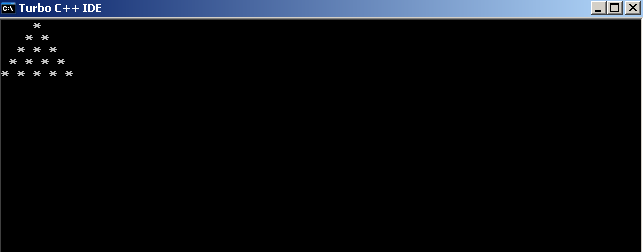
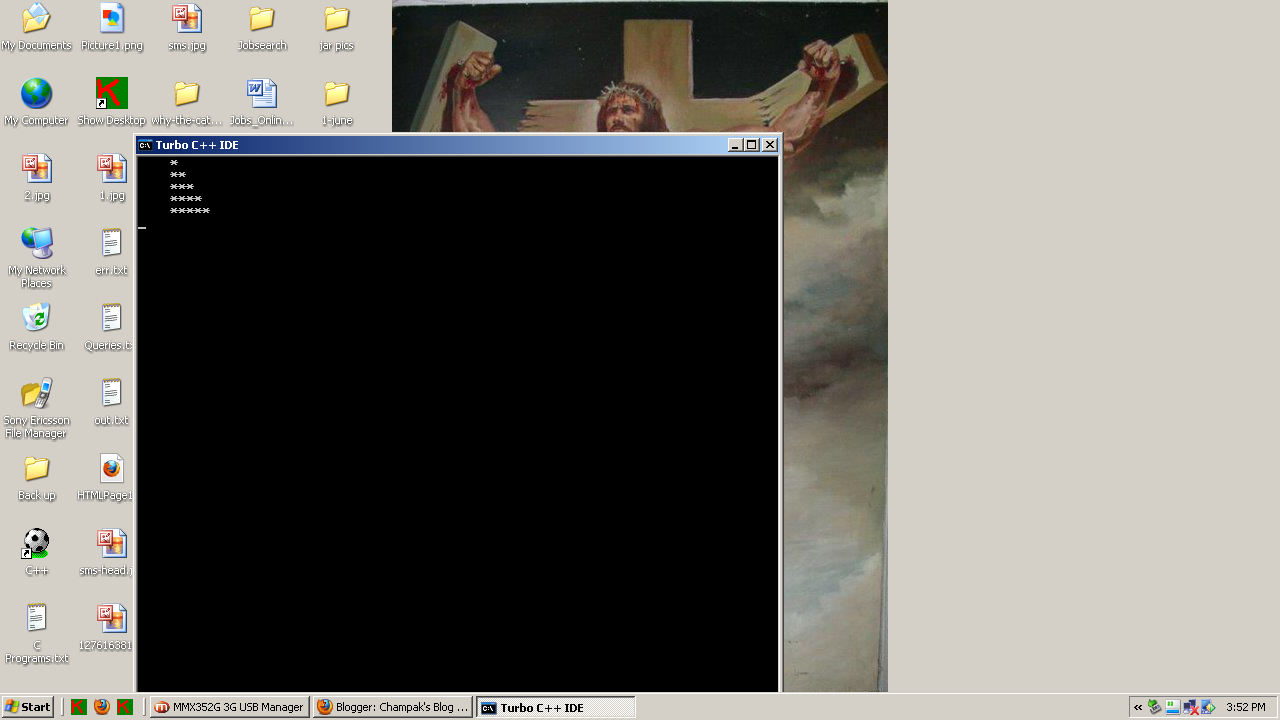
Drawing Pyramids


#include<stdio.h>

#include<conio.h>

void main()

{

int n=5,i,j,k;

clrscr();

for(i=1;i<=n;i++)

{

for(j=1;j<=n-1;j++)

printf(" ");

for(k=1;k<=i;k++)

printf("*");

printf("\n");

}

getch();

}

#include<stdio.h>
#include<conio.h>
void main()
{
int n=5,i,j,k;
clrscr();
for(i=1;i<=n;i++)
{
for(j=1;j<=0;j++)
printf(" ");
for(k=1;k<=i;k++)
printf("*");
printf("\n");
}
getch();
}


#include<stdio.h>
#include<conio.h>
void main()
{
int n=5,i,j,k;
clrscr();
for(i=1;i<=n;i++)
{
for(j=1;j<=n-i;j++)
printf(" ");
for(k=1;k<=2*i-1;k++)
printf("*");
printf("\n");
}
getch();
}

#include<stdio.h>
#include<conio.h>
#include<math.h>
void main()
{
int n=5,i,j,k;
int x,y;
clrscr();
for(i=1;i<=n;i++)
{
for(j=1;j<=n-i;j++)
printf(" ");
for(k=1;k<=2*i-1;k++)
{
x=i-abs(i-k);
printf("%d",x);
}
printf("\n");
}
getch();
}


#include<stdio.h>
#include<conio.h>
#include<math.h>
void main()
{
int n=5,i,j,k;
int x,y;
clrscr();
for(i=1;i<=n;i++)
{
for(j=1;j<=n-i;j++)
printf(" ");
for(k=1;k<=2*i-1;k++)
{
x=i-abs(i-k);
printf("%c",'A' + x -1);
}
printf("\n");
}
getch();
}


#include<stdio.h>
#include<conio.h>
#include<math.h>
void main()
{
int n=5,i,j,k;
int x,y;
clrscr();
for(i=n;i>=1;i--)
{
for(j=1;j<=n-i;j++)
printf(" ");
for(k=1;k<=2*i-1;k++)
{
x=i-abs(i-k);
printf("%c",'A' + x -1);
}
printf("\n");
}
getch();
}


#include<stdio.h>
#include<conio.h>
#include<math.h>
void main()
{
int n=5,i,j,k;
clrscr();
for(i=1;i<=n;i++)
{
for(j=1;j<=n-i;j++)
printf(" ");
for(k=1;k<=i;k++)
{
printf("* ");
}
printf("\n");
}
getch();
}


#include<stdio.h>
#include<conio.h>
#include<math.h>
int pascalvalue(int y,int x);
void main()
{
int n=5,i,j,k;
clrscr();
for(i=1;i<=n;i++)
{
for(j=1;j<=n-i;j++)
printf(" ");
for(k=1;k<=i;k++)
{
printf("%d ",pascalvalue(i,k));
}
printf("\n");
}
getch();
}

int pascalvalue(int y,int x)
{
if(x==1)
return(1);
if(x==y)
return(1);
return(pascalvalue(y-1,x-1) + pascalvalue(y-1,x));
}
#include<stdio.h>
#include<conio.h>
#include<math.h>

void main()
{
int n=5,i,j,k;
int mid=(n+1)/2,x,y;
clrscr();
for(i=1;i<=n;i++)
{
x=abs(mid-i);
y=mid-x;
for(j=1;j<=y;j++)
printf(" ");
for(k=1;k<=2*x+1;k++)
printf("*");
printf("\n");
}
getch();
}


#include<stdio.h>
#include<conio.h>
#include<math.h>

void main()
{
int n=5,i,j,k;
int mid=(n+1)/2,x,y,z;
clrscr();
for(i=1;i<=n;i++)
{
x=abs(mid-i);
y=mid-x;
for(j=1;j<=y;j++)
printf(" ");
for(k=1;k<=2*x+1;k++)
{
z=x-abs(x+1-k)+1;
printf("%d",z);
}
printf("\n");
}
getch();
}


#include<stdio.h>
#include<conio.h>
#include<math.h>

void main()
{
int n=5,i,j,k;
int mid=(n+1)/2,x,y,z;
clrscr();
for(i=1;i<=n;i++)
{
x=abs(mid-i);
y=mid-x;
for(j=1;j<=y;j++)
printf(" ");
for(k=1;k<=2*x+1;k++)
{
z=x-abs(x+1-k);
printf("%c",'A' + z);
}
printf("\n");
}
getch();
}

#include<stdio.h>
#include<conio.h>
#include<math.h>

void main()
{
int n=5,i,j,k;
int mid=(n+1)/2,x,y,l,r;
clrscr();
for(i=1;i<=n;i++)
{
x=abs(mid-i)+1;
y=mid-x;
for(j=1;j<=n;j++)
{
l=j;
r=n+1-j;
if(j<=x || r<=x)
printf("*");
else
printf(" ");
}
printf("\n");
}
getch();
}
#include<stdio.h>
#include<conio.h>
#include<math.h>

void main()
{
int n=11,i,j,k;
int mid=(n+1)/2,x,y,l,r,z;
clrscr();
for(i=1;i<=n;i++)
{
x=abs(mid-i)+1;
y=mid-x;
for(j=1;j<=n;j++)
{
l=j;
r=n+1-j;
z=abs(mid-j);
if(j<=x || r<=x)
printf("%d",z);
else
printf(" ");
}
printf("\n");
}
getch();
}
#include<stdio.h>
#include<conio.h>
#include<math.h>

void main()
{
int n=11,i,j,k;
int mid=(n+1)/2,x,y,l,r,z;
clrscr();
for(i=1;i<=n;i++)
{
x=abs(mid-i)+1;
y=mid-x;
for(j=1;j<=n;j++)
{
l=j;
r=n+1-j;
z=mid-abs(mid-j)-1;
if(j<=x || r<=x)
printf("%c",'A' + z);
else
printf(" ");
}
printf("\n");
}
getch();
}

#include<stdio.h>
#include<conio.h>
#include<math.h>
#define n 4
void main()
{

int l=0,r=n-1,t=0,b=n-1,i,x=1,j;
int a[n][n];
clrscr();
while(x<=n*n)
{
for(i=l;i<=r;i++)
a[t][i]=x++;
t++;
for(i=t;i<=b;i++)
a[i][r]=x++;
r--;
for(i=r;i>=l;i--)
a[b][i]=x++;
b--;
for(i=b;i>=t;i--)
a[i][l]=x++;
l++;
}
for(i=0;i<=n-1;i++)
{
for(j=0;j<=n-1;j++)
printf("%4d",a[i][j]);
printf("\n");
}
getch();
}

#include<stdio.h>
#include<conio.h>
#include<math.h>
#define n 4
void main()
{

int l=0,r=n-1,t=0,b=n-1,i,x=1,j;
int a[n][n];
clrscr();
while(x<=n*n)
{
for(i=l;i<=r;i++)
a[t][i]=x++;
t++;
for(i=t;i<=b;i++)
a[i][r]=x++;
r--;
for(i=r;i>=l;i--)
a[b][i]=x++;
b--;
for(i=b;i>=t;i--)
a[i][l]=x++;
l++;
}
for(i=0;i<=n-1;i++)
{
for(j=0;j<=n-1;j++)
printf("%4d",n*n + 1-a[i][j]);
printf("\n");
}
getch();
}

Monday, May 28, 2012

Pointers in C

A pointer is the address of a variable.For understanding pointers let us consider the following declarations:-

There are only two operators in C regarding pointers.
& is the addressing operator, and when applied to a variable gives it's address.

* is the value or indirection operator. When applied to an address it gives the value at the address. 

1) 
int x=10;
int *p=&x;
int **q=&p;

x is a variable of type int. It's value is 10. Let us assume it's address is 1000.

int *p; *p is an int, p is the address of an int.The value of p is &x i,e address of x which is 1000.

int **q; **q is an int, *q is a pointer to int, q is a pointer to pointer to int.


x is thus equivalent to *p and both are 10.
&x is equivalent to p and is 1000


What is &*p?
replace *p by x, we get &x which is p .
Therefore we can say that &* cancel out.

The same is true for *&x.


Consider this program :-
*******************************ptr.c**************************
#include<stdio.h>
#include<conio.h>
void main()
{
int x=10;
int *p=&x;
clrscr();
printf("%u,%d\n",&x,x);
printf("%u,%d\n",p,*p);
getch();
}


The output:-


64948,10
64948,10

The equivalence of Arrays & Pointers.

The following program should be self explanatory:-


#include<stdio.h>
#include<conio.h>
void main()
{
int a[]={1,2,3,4,5},n=5,i;
int *p=a;
clrscr();
for(i=0;i<=n-1;i++)
printf("%d,",*(p+i));
printf("\n");
for(p=a;p<=&a[n-1];p++)
printf("%d,",*p);
printf("\n");
for(p=a;p<=&a[n-1];)
printf("%d,",*p++);
printf("\n");
//This reads the array using array syntax
for(i=0;i<=n-1;i++)
scanf("%d",&a[i]);
for(p=a;p<=&a[n-1];)
printf("%d,",*p++);
printf("\n");
//Since &a[i] translates to p+i, therefore we have
for(p=a;p<=&a[n-1];)
scanf("%d",p++);
printf("\n");

for(p=a;p<=&a[n-1];)
printf("%d,",*p++);
printf("\n");
getch();
}
The output:-


Parameter passing using pointers

#include<stdio.h>
#include<conio.h>
void valueswap (int a,int b);
void ptrswap(int* a,int* b);
void main()
{
int x=5,y=10;
clrscr();
printf("Value before value swap a = %d, b = %d\n",x,y);
valueswap(x,y);
printf("Value after value swap a = %d, b = %d\n",x,y);
printf("Value before ptr swap a = %d, b = %d\n",x,y);
ptrswap(&x,&y);
printf("Value after ptr swap a = %d, b = %d\n",x,y);
getch();
}
void valueswap (int a,int b)
{
int t=a;
a=b;
b=t;
}
void ptrswap(int* a,int* b)
{
int t=*a;
*a=*b;
*b=t;
}


The output:-

To understand this assume the following.

Variable    |    Value    |    Address
x                    5               1000
y                    10             1002


for valueswap

void valueswap (int a,int b)
{
int t=a;
a=b;
b=t;
}


after parameter copy
a=5
b=10

int t=a; t = 5
a=b; a=10;
b=t; b=5

The values of x and y are not changed. Therefore the output in main remains unaffected .


For ptrswap


void ptrswap(int* a,int* b)
{
int t=*a;
*a=*b;
*b=t;
}


It is called as ptrswap(&x,&y);=ptrswap(1000,1002);
Therefore after  parameter passing a=1000, and b=1002


int t=*a which translates as t=*1000 which means value at address 1000 which is the value of x ans is 5.
so t=5;


*a=*b, which translates as *1000 = * 1002. Replace value at address 1000 with value at address 1002.
This means that x becomes 10.


*b=t; which translates as *1002=5. Therefore value at address 1002, i,e y becomes 5.


Therefore , x and y are swapped.


Saturday, May 19, 2012

Implementing 1's Complement & 2's Complement in C

1's complement and 2's complement arithmetic is used in Computer Science for implementing the basic operations of addition and subtraction. In this program , I have endeavored to provide a simple menu based example in C of these basic operations. 

To implement these operations I have developed the following functions:-

void printMenu()
{
clrscr();
gotoxy(5,5);
printf("Read\tPrint\t1'sComplement\t2'sComplement\tAdd\tSub\teXit\n");
printf("A = ");
printNumber(a);
printf("  B = ");
printNumber(b);
printf("  C = ");
printNumber(c);
printf("\n");
}
This is the Menu. It works by pressing R,P,1,2,A,S,X
The menu is not case sensitive.

void copyArray(int dest[],int src[])
{
 int i;
 for(i=0;i<=8;i++)
 dest[i]=src[i];
}
copies the src array into dest.


int getCarry(int a,int b,int c)
{
int sum=a+b+c;
switch(sum)
{
 case 0:return(0);
 case 1:return(0);
 case 2:return (1);
 default:return(1);
}
}
adds 3 bits and returns the carry.


int getSum(int a,int b,int c)
{
int sum=a+b+c;
switch(sum)
{
 case 0:return(0);
 case 1:return(1);
 case 2:return (0);
 default:return(1);
}
}
Adds three bits and returns the sum


void TwosComplement(int x[])
{
int temp[]={1,0,0,0,0,0,0,0,0};
int out[9];
copyArray(out,x);
OnesComplement(out);
addNumber(out,temp,x);
}
finds the 2's complement of a number and stores it in the same array.


void OnesComplement(int x[])
{
int i;
for(i=8;i>=0;i--)
x[i]=1-x[i];
}
finds the 1's complement of a number.

void printNumber(int x[])
{
int i;
for(i=8;i>=0;i--)
printf("%d",x[i]);
}
prints the number

void readNumber(int x[])
{
int i;
char str[10];
scanf("%s",str);
for(i=8;i>=0;i--)
x[i]=(str[8-i]-'0'); //0,1,2,3,4 '0'-'0'=0,'1'-'0'=1
 }

reads a number as a string of 9 characters and stores it in a int array.

void subNumber(int x[],int y[],int sub[])
{
int temp[9];
copyArray(temp,y);
TwosComplement(temp);
addNumber(x,temp,sub);
}
subtracts 2 numbers and stores it in the 3rd parameter

Important

Each array is 9 elements, 8 for the byte and the ninth for the sine bit.
Therefore values must be entered as such

Here are some snapshots:-


The Complete Program

Binary.c

#include<stdio.h>                                                  
#include<conio.h>
#include<math.h>
int a[9]={0,0,0,0,0,0,0,0,0},b[9]={0,0,0,0,0,0,0,0,0},c[9]={0,0,0,0,0,0,0,0,0};
void readNumber(int x[]);
void printNumber(int x[]);
void OnesComplement(int x[]);
void addNumber(int x[],int y[],int sum[]);
void TwosComplement(int x[]);
int getSum(int a,int b,int c);
int getCarry(int a,int b,int c);
void copyArray(int dest[],int src[]);
void subNumber(int x[],int y[],int sub[]);
void printMenu();
void main()
{

int option,ch;
clrscr();
while(1)
{
printMenu();
option=getch();
switch(option)
{
case'X':
case'x':
return;
case 'r':
case 'R':
printf("\nEnter a or b: ");
ch=getche();
printf(" = ");
if(ch=='a' || ch=='A')
readNumber(a);
else
readNumber(b);
break;
case '1':
printf("\nEnter a or b: ");
ch=getche();
printf(" = )");
if(ch=='a' || ch=='A')
OnesComplement(a);
else
OnesComplement(b);
break;

case '2':
printf("\nEnter a or b: ");
ch=getche();
printf(" = ");
if(ch=='a' || ch=='A')
TwosComplement(a);
else
TwosComplement(b);
break;
case 'a':
case 'A':
addNumber(a,b,c);
break;
case 's':
case 'S':
subNumber(a,b,c);
break;
}
}
}
void printMenu()
{
clrscr();
gotoxy(5,5);
printf("Read\tPrint\t1'sComplement\t2'sComplement\tAdd\tSub\teXit\n");
printf("A = ");
printNumber(a);
printf("  B = ");
printNumber(b);
printf("  C = ");
printNumber(c);
printf("\n");
}
void copyArray(int dest[],int src[])
{
 int i;
 for(i=0;i<=8;i++)
 dest[i]=src[i];
}
void addNumber(int x[],int y[],int sum[])
{
 int i,s,carry=0;
 for(i=0;i<=8;i++)
{
   s=getSum(x[i] ,y[i],carry);
   carry=getCarry(x[i],y[i],carry);
   sum[i]=s;
}
}
int getCarry(int a,int b,int c)
{
int sum=a+b+c;
switch(sum)
{
 case 0:return(0);
 case 1:return(0);
 case 2:return (1);
 default:return(1);
}
}
int getSum(int a,int b,int c)
{
int sum=a+b+c;
switch(sum)
{
 case 0:return(0);
 case 1:return(1);
 case 2:return (0);
 default:return(1);
}
}
void TwosComplement(int x[])
{
int temp[]={1,0,0,0,0,0,0,0,0};
int out[9];
copyArray(out,x);
OnesComplement(out);
addNumber(out,temp,x);
}
void OnesComplement(int x[])
{
int i;
for(i=8;i>=0;i--)
x[i]=1-x[i];
}
void printNumber(int x[])
{
int i;
for(i=8;i>=0;i--)
printf("%d",x[i]);
}

void readNumber(int x[])
{
int i;
char str[10];
scanf("%s",str);
for(i=8;i>=0;i--)
x[i]=(str[8-i]-'0'); //0,1,2,3,4 '0'-'0'=0,'1'-'0'=1
 }
void subNumber(int x[],int y[],int sub[])
{
int temp[9];
copyArray(temp,y);
TwosComplement(temp);
addNumber(x,temp,sub);
}
Next, we shall use it to implement the Booth's algorithm

Thursday, May 10, 2012

Joins in MS SQL Server,Oracle & MY SQL

Joins are a way of connecting data from more than one table.We can also have joins on the same table by creating aliases. There are four basic joins 
1) Outer join
2) Left outer join
3) Right outer join
4) inner join.

In this post, we shall learn the syntax of joins on MS SQL Server, Oracle & MY SQL.

First, the tables:-

1) create table medicalcharlatans(CharlatanName varchar(100) primary key,CharlatanRank int,CharlatanDescrption varchar(200))

Then insert some data.

insert into medicalcharlatans values('Jesus Christ',1,'Used to treat diseases by driving out demons')
insert into medicalcharlatans values('Mother Teresa',2,'Cured cancer via Light Emitting Photo')
insert into medicalcharlatans values('Benny Hinn',3,'Cured diseases via Touch Therapy')


Here is a view of the table:-
Benny Hinn    3    Cured diseases via Touch Therapy
Jesus Christ    1    Used to treat diseases by driving out demons
Mother Teresa    2    Cured cancer via Light Emitting Photo


2) create table PedofileProtectors(ProtectorName varchar(100) primary key,ProtectorDescrption varchar(200))


insert into PedofileProtectors values('John Paul 2','Protected Pedofiles and promoted Pedofile protectors like Mother Teresa and Ratzinger')

insert into PedofileProtectors values('Ratzinger','Protected Pedofiles and promoted Pedofile protectors like Mother Teresa and John Paul 2')

insert into PedofileProtectors values('Mother Teresa','Protected Pedofiles and promoted Pedofile protectors like John Paul 2 and Ratzinger, wrote letters of support for recognized Pedofiles')

The table as it stands now :-


John Paul 2    Protected Pedofiles and promoted Pedofile protectors like Mother Teresa and Ratzinger

Mother Teresa    Protected Pedofiles and promoted Pedofile protectors like John Paul 2 and Ratzinger, wrote letters of support for recognized Pedofiles


Ratzinger    Protected Pedofiles and promoted Pedofile protectors like Mother Teresa and John Paul 2


The various Joins :-


Cross Join


The cross join is a cartesian product. Here is the output in MS SQL Server. Incidentally , it's the same in all three databases.


select * from medicalcharlatans cross join  PedofileProtectors
This is supported by all three databases


SELECT     CharlatanName,ProtectorName FROM         medicalcharlatans  full outer JOIN PedofileProtectors ON CharlatanName = ProtectorName
Not supported in my SQL. We shall learn in a subsequent post to simulate it using Union.

SELECT     CharlatanName,ProtectorName FROM         medicalcharlatans  right outer JOIN PedofileProtectors ON CharlatanName = ProtectorName
It's supported in Oracle.
In My SQL :- SELECT     CharlatanName,ProtectorName FROM         medicalcharlatans  right JOIN PedofileProtectors ON CharlatanName = ProtectorName

SELECT     CharlatanName,ProtectorName FROM         medicalcharlatans  left outer JOIN PedofileProtectors ON CharlatanName = ProtectorName


It's supported in Oracle.
In My SQL :- SELECT     CharlatanName,ProtectorName FROM         medicalcharlatans  left JOIN PedofileProtectors ON CharlatanName = ProtectorName


SELECT     CharlatanName,ProtectorName FROM         medicalcharlatans  inner JOIN PedofileProtectors ON CharlatanName = ProtectorName

 SELECT     CharlatanName,ProtectorName FROM         medicalcharlatans JOIN PedofileProtectors ON CharlatanName = ProtectorName
It's supported in all three databases.


In a subsequent post, we shall discuss unions, intersections, minus, and the top and rownum

Thursday, April 12, 2012

Session Listeners in Apache Tomcat

To implement a SessionListener in java we implement the javax.servlet.http.HttpSessionListener interface.

Here is our implementation of the HttpSessionListener

CountSessionListener
package servletpackage;
import java.sql.*;
import javax.naming.*;
import javax.servlet.*;
import javax.servlet.http.*;
public class CountSessionListener implements HttpSessionListener
{
public void sessionCreated(HttpSessionEvent event)
{
HttpSession session=event.getSession();
try
{

String id=session.getId();
java.util.Date d=new java.util.Date();
System.out.println("Session Created with ID=" + id  + " at  time " + d);
}
catch(Exception ex)
{
System.out.println(ex);
}
}
public void sessionDestroyed(HttpSessionEvent event)
{
HttpSession session=event.getSession();
try
{
String id=session.getId();
java.util.Date d=new java.util.Date();
System.out.println("Session Destroyed with ID=" + id  + " at  time " + d);
}
catch(Exception ex)
{
System.out.println(ex);
}
}
}

To redirect the Standard Output in Apache Tomcat we use the logging tab in the Tomcat Monitor.


To install this session listener the following entries are required in the web.xml file.

web.xml

<web-app>
<listener>
<listener-class>servletpackage.CountSessionListener</listener-class>
</listener>

<session-config>
<session-timeout>2</session-timeout>
</session-config>
</web-app>

The underlined portion is the session listener configuration. We have also set a session timeout of 2 minutes.

To test the listener create two jsp pages. hello.jsp, and bye.jsp. hello.jsp creates a session while bye.jsp destroys it.

Here are the two files:-

hello.jsp

<%
request.getSession(true);
%>

bye.jsp

<%
session.invalidate();
%>


Open the two files and refresh them alternately in the browser.

Here is the output in the out.txt file where the System.out is redirected.


2012-04-12 14:01:32 Commons Daemon procrun stdout initialized
Session Created with ID=EA0AEFF5335E7F8E9B59F99FBDA5157D at  time Thu Apr 12 14:01:44 IST 2012
Session Destroyed with ID=EA0AEFF5335E7F8E9B59F99FBDA5157D at  time Thu Apr 12 14:02:05 IST 2012
Session Created with ID=2BE4BD1A6EFAA45785F63EB5991B46D1 at  time Thu Apr 12 14:24:04 IST 2012
Session Destroyed with ID=2BE4BD1A6EFAA45785F63EB5991B46D1 at  time Thu Apr 12 14:24:04 IST 2012
Session Created with ID=2BFF301ED2C87299CB0E75F51323340D at  time Thu Apr 12 14:24:06 IST 2012

Exchanging the value of Variables

In this post we shall look at the various ways of interchanging the values of variables. We shall not be looking into methods involving loops, but only simple expression based methods.

Essentially, any binary operation which has an inverse can be used as a basis for the exchange. Thus, we shall use the assignment operator, addition, subtraction, multiplication and division. The last two will require the divisor to be non zero.


Here is the program which does this exchange.

Exchange.c

#include<stdio.h>
#include<conio.h>
#include<math.h>
void main()
{
float a=15,b=10,t;
clrscr();
printf("Original values a=%f,b=%f",a,b);
printf("\nSwap using a temporary variable\n");
t=a;a=b;b=t;
printf("Swapped values a=%f,b=%f",a,b);
printf("\nSwap using a substraction\n");
a=a-b;b=a+b;a=b-a;
printf("Swapped values a=%f,b=%f",a,b);
printf("\nSwap using a addition\n");
a=a+b;b=a-b;a=a-b;
printf("Swapped values a=%f,b=%f",a,b);
printf("\nSwap using a multiplication\n");
a=a*b;b=a/b;a=a/b;
printf("Swapped values a=%f,b=%f",a,b);
printf("\nSwap using a division\n");
a=a/b;b=a*b;a=b/a;
printf("Swapped values a=%f,b=%f",a,b);
getch();
}
This is the output of the program

Original values a=15.000000,b=10.000000
Swap using a temporary variable
Swapped values a=10.000000,b=15.000000
Swap using a substraction
Swapped values a=15.000000,b=10.000000
Swap using a addition
Swapped values a=10.000000,b=15.000000
Swap using a multiplication
Swapped values a=15.000000,b=10.000000
Swap using a division
Swapped values a=10.000000,b=15.000000


Rotation of values
Rotation of values a<--b, b<-- c, c<-- a

This is accomplished through the following program code.

#include<stdio.h>
#include<conio.h>
void main()
{
int a=1,b=2,c=3,t;
clrscr();
printf("Original values a=%d,b=%d,c=%d\n",a,b,c);
t=a;
a=b;
b=c;
c=t;
printf("Rotated values a=%d,b=%d,c=%d\n",a,b,c);
getch();
}

Here is the output of this program

Original values a=1,b=2,c=3
Rotated values a=2,b=3,c=1


Exchanging two elements via a temporary variable is a special case of the general rotation problem. As an interesting aside we can see that for n elements to be rotated, n rotations would give back the original set.

Sunday, February 19, 2012

Database & DDL Triggers in Oracle

In this post, we shall create a series of triggers to illustrate the use of Database triggers in Oracle.

Database Triggers:-


Database triggers are fired on Login & Logout. Let us create a trigger to maintain a list of logins & logouts. First a table to store the login information:-


create table LoginStats(username varchar(50),datetimeoflogin date)


Here is the trigger:-

create or replace trigger logintrigger
after logon on database
begin
insert into LoginStats values(ora_login_user,sysdate);
end;


A logon trigger can only be a after trigger.


A trigger for Logout

The table :

create table LogoutStats(username varchar(50),datetimeoflogout date)


create or replace trigger logofftrigger
before logoff on database
begin
insert into LogoutStats values(ora_login_user,sysdate);
end;


DDL Triggers are created for Create,Alter & Drop statements.

Here is a trigger that tracks created objects:-

create table CreatedObjects(CreatedByUser varchar(100),ObjectName varchar(100),ObjectType varchar(100),DateofCreation date)


CREATE or replace TRIGGER Databasecreateobjecttrigger AFTER CREATE
   ON database
begin
insert into CreatedObjects values(ora_login_user,ora_dict_obj_name,ora_dict_obj_type,sysdate);
end;


For DML Triggers , please refer http://champakonline.blogspot.com/2010/10/some-triggers-in-oracle.html

Friday, February 17, 2012

Calling a Web Service through Android and passing Parameters

In the last post http://champakonline.blogspot.com/2012/02/calling-web-service-through-android.html , we learned how to call a .Net Web Service from Android. In this post, we shall call a Web Service that requires parameters to be sent.
For this application, we shall use the Web Service whose WSDL is at
http://hypatiasoftwaresolutions.com/HypatiaQuotesService.asmx?WSDL

The WSDL is


<wsdl:definitions targetNamespace="http://tempuri.org/"><wsdl:types><s:schema elementFormDefault="qualified" targetNamespace="http://tempuri.org/"><s:element name="getBirthday"><s:complexType><s:sequence><s:element minOccurs="0" maxOccurs="1" name="name" type="s:string"/></s:sequence></s:complexType></s:element><s:element name="getBirthdayResponse"><s:complexType><s:sequence><s:element minOccurs="0" maxOccurs="1" name="getBirthdayResult" type="s:string"/></s:sequence></s:complexType></s:element><s:element name="GetAQuote"><s:complexType/></s:element><s:element name="GetAQuoteResponse"><s:complexType><s:sequence><s:element minOccurs="0" maxOccurs="1" name="GetAQuoteResult" type="s:string"/></s:sequence></s:complexType></s:element></s:schema></wsdl:types><wsdl:message name="getBirthdaySoapIn"><wsdl:part name="parameters" element="tns:getBirthday"/></wsdl:message><wsdl:message name="getBirthdaySoapOut"><wsdl:part name="parameters" element="tns:getBirthdayResponse"/></wsdl:message><wsdl:message name="GetAQuoteSoapIn"><wsdl:part name="parameters" element="tns:GetAQuote"/></wsdl:message><wsdl:message name="GetAQuoteSoapOut"><wsdl:part name="parameters" element="tns:GetAQuoteResponse"/></wsdl:message><wsdl:portType name="HypatiaQuotesServiceSoap"><wsdl:operation name="getBirthday"><wsdl:input message="tns:getBirthdaySoapIn"/><wsdl:output message="tns:getBirthdaySoapOut"/></wsdl:operation><wsdl:operation name="GetAQuote"><wsdl:input message="tns:GetAQuoteSoapIn"/><wsdl:output message="tns:GetAQuoteSoapOut"/></wsdl:operation></wsdl:portType><wsdl:binding name="HypatiaQuotesServiceSoap" type="tns:HypatiaQuotesServiceSoap"><soap:binding transport="http://schemas.xmlsoap.org/soap/http"/><wsdl:operation name="getBirthday"><soap:operation soapAction="http://tempuri.org/getBirthday" style="document"/><wsdl:input><soap:body use="literal"/></wsdl:input><wsdl:output><soap:body use="literal"/></wsdl:output></wsdl:operation><wsdl:operation name="GetAQuote"><soap:operation soapAction="http://tempuri.org/GetAQuote" style="document"/><wsdl:input><soap:body use="literal"/></wsdl:input><wsdl:output><soap:body use="literal"/></wsdl:output></wsdl:operation></wsdl:binding><wsdl:binding name="HypatiaQuotesServiceSoap12" type="tns:HypatiaQuotesServiceSoap"><soap12:binding transport="http://schemas.xmlsoap.org/soap/http"/><wsdl:operation name="getBirthday"><soap12:operation soapAction="http://tempuri.org/getBirthday" style="document"/><wsdl:input><soap12:body use="literal"/></wsdl:input><wsdl:output><soap12:body use="literal"/></wsdl:output></wsdl:operation><wsdl:operation name="GetAQuote"><soap12:operation soapAction="http://tempuri.org/GetAQuote" style="document"/><wsdl:input><soap12:body use="literal"/></wsdl:input><wsdl:output><soap12:body use="literal"/></wsdl:output></wsdl:operation></wsdl:binding><wsdl:service name="HypatiaQuotesService"><wsdl:port name="HypatiaQuotesServiceSoap" binding="tns:HypatiaQuotesServiceSoap"><soap:address location="http://hypatiasoftwaresolutions.com/HypatiaQuotesService.asmx"/></wsdl:port><wsdl:port name="HypatiaQuotesServiceSoap12" binding="tns:HypatiaQuotesServiceSoap12"><soap12:address location="http://hypatiasoftwaresolutions.com/HypatiaQuotesService.asmx"/></wsdl:port></wsdl:service></wsdl:definitions>


Since we shall be calling the getBirthday method. The relevant portions to remember are :-


1) <wsdl:definitions targetNamespace="http://tempuri.org/">

2)  <soap:operation soapAction="http://tempuri.org/getBirthday" style="document"/>

3)  <s:sequence><s:element minOccurs="0" maxOccurs="1" name="name" type="s:string"/></s:sequence>

The first one gives the namespace to be used, the second is the soap action, and the third is the parameter to be passed. The name of the parameter is "name" while the type is "s:string".

It is important to note that, should any of these three items be used wrongly, the parameter passing and calling would not work.


Here is the code for the activity:-

HypatiaFriendsActivity.java

package hypatia.friends;

import android.app.Activity;
import android.os.Bundle;
import android.view.View;
import android.view.View.OnClickListener;
import android.widget.Button;
import android.widget.EditText;
import android.widget.TextView;
import org.ksoap2.SoapEnvelope;
import org.ksoap2.serialization.PropertyInfo;
import org.ksoap2.serialization.SoapObject;
import org.ksoap2.serialization.SoapSerializationEnvelope;
import org.ksoap2.transport.HttpTransportSE;
public class HypatiaFriendsActivity extends Activity  implements OnClickListener{
    /** Called when the activity is first created. */
    private Button b;
    private TextView tv;
    private EditText txtname;
    private TextView txtBirthday;
    @Override
    public void onCreate(Bundle savedInstanceState) {
        super.onCreate(savedInstanceState);
        setContentView(R.layout.main);
        b=(Button)findViewById(R.id.button1);
        tv=(TextView)findViewById(R.id.txtName);
        txtBirthday=(TextView)findViewById(R.id.txtBirthday);
        txtname=(EditText)findViewById(R.id.txtName);
        b.setOnClickListener(this);
       
    }
    @Override
    public void onClick(View arg0) {
        // TODO Auto-generated method stub
        try
        {
        String namespace = "http://tempuri.org/";
        String url ="http://hypatiasoftwaresolutions.com/HypatiaQuotesService.asmx?WSDL";   
        String soapaction = "http://tempuri.org/getBirthday";
        String methodname = "getBirthday";
        SoapObject request = new SoapObject(namespace, methodname);    
        request.addProperty("name","" + txtname.getText());
        SoapSerializationEnvelope envelope = new SoapSerializationEnvelope(SoapEnvelope.VER11);
        envelope.dotNet=true;
        envelope.setOutputSoapObject(request);
        HttpTransportSE androidHttpTransport = new HttpTransportSE (url);

       
            androidHttpTransport.call(soapaction, envelope);
            org.ksoap2.serialization.SoapObject resultsRequestSOAP =(org.ksoap2.serialization.SoapObject) envelope.bodyIn;
            txtBirthday.setText("" + resultsRequestSOAP.getProperty(0));
        }
        catch(Exception ex)
        {
            tv.setText("" + ex);
        }
    }
}


main.xml

<?xml version="1.0" encoding="utf-8"?>
<LinearLayout xmlns:android="http://schemas.android.com/apk/res/android"
    android:layout_width="fill_parent"
    android:layout_height="fill_parent"
    android:orientation="vertical" >

    <TextView
        android:layout_width="fill_parent"
        android:layout_height="wrap_content"
        android:text="@string/hello" />


    <TextView
        android:id="@+id/txtBirthday"
        android:layout_width="match_parent"
        android:layout_height="wrap_content"
        android:text="@string/blank"
        android:textAppearance="?android:attr/textAppearanceLarge" />


    <EditText
        android:id="@+id/txtName"
        android:layout_width="match_parent"
        android:layout_height="wrap_content"
        android:inputType="textPersonName" >

        <requestFocus />
    </EditText>

    <Button
        android:id="@+id/button1"
        android:layout_width="match_parent"
        android:layout_height="wrap_content"
        android:text="@string/buttontext" />

</LinearLayout>

strings.xml

<?xml version="1.0" encoding="utf-8"?>
<resources>

    <string name="hello">Hypatia Friend Finder</string>
    <string name="app_name">HypatiaFriends</string>
    <string name="buttontext">Get Birthday</string>
    <string name="blank"></string>

</resources>


AndroidManifest.xml

<?xml version="1.0" encoding="utf-8"?>
<manifest xmlns:android="http://schemas.android.com/apk/res/android"
    package="hypatia.friends"
    android:versionCode="1"
    android:versionName="1.0" >

    <uses-sdk android:minSdkVersion="8" />
<uses-permission
        android:name="android.permission.INTERNET" />
    <application
        android:icon="@drawable/ic_launcher"
        android:label="@string/app_name" >
        <activity
            android:label="@string/app_name"
            android:name=".HypatiaFriendsActivity" >
            <intent-filter >
                <action android:name="android.intent.action.MAIN" />

                <category android:name="android.intent.category.LAUNCHER" />
            </intent-filter>
        </activity>
    </application>

</manifest>


The Internet permission is important here, because this application accesses the internet.
<uses-permission
        android:name="android.permission.INTERNET" />


Tuesday, February 14, 2012

Calling a Web Service through Android

Calling a Web Service using Android
In this post we shall learn how to call a web service using Android.
For this purpose we shall use the Hypatia Quotes Web Service at
http://hypatiasoftwaresolutions.com/HypatiaQuotesService.asmx
which returns random quotes of Hypatia.

The WSDL for this Web Service is :-

http://hypatiasoftwaresolutions.com/HypatiaQuotesService.asmx?WSDL

<wsdl:definitions targetNamespace="http://tempuri.org/"><wsdl:types><s:schema elementFormDefault="qualified" targetNamespace="http://tempuri.org/"><s:element name="GetAQuote"><s:complexType/></s:element><s:element name="GetAQuoteResponse"><s:complexType><s:sequence><s:element minOccurs="0" maxOccurs="1" name="GetAQuoteResult" type="s:string"/></s:sequence></s:complexType></s:element></s:schema></wsdl:types><wsdl:message name="GetAQuoteSoapIn"><wsdl:part name="parameters" element="tns:GetAQuote"/></wsdl:message><wsdl:message name="GetAQuoteSoapOut"><wsdl:part name="parameters" element="tns:GetAQuoteResponse"/></wsdl:message><wsdl:portType name="HypatiaQuotesServiceSoap"><wsdl:operation name="GetAQuote"><wsdl:input message="tns:GetAQuoteSoapIn"/><wsdl:output message="tns:GetAQuoteSoapOut"/></wsdl:operation></wsdl:portType><wsdl:binding name="HypatiaQuotesServiceSoap" type="tns:HypatiaQuotesServiceSoap"><soap:binding transport="http://schemas.xmlsoap.org/soap/http"/><wsdl:operation name="GetAQuote"><soap:operation soapAction="http://tempuri.org/GetAQuote" style="document"/><wsdl:input><soap:body use="literal"/></wsdl:input><wsdl:output><soap:body use="literal"/></wsdl:output></wsdl:operation></wsdl:binding><wsdl:binding name="HypatiaQuotesServiceSoap12" type="tns:HypatiaQuotesServiceSoap"><soap12:binding transport="http://schemas.xmlsoap.org/soap/http"/><wsdl:operation name="GetAQuote"><soap12:operation soapAction="http://tempuri.org/GetAQuote" style="document"/><wsdl:input><soap12:body use="literal"/></wsdl:input><wsdl:output><soap12:body use="literal"/></wsdl:output></wsdl:operation></wsdl:binding><wsdl:service name="HypatiaQuotesService"><wsdl:port name="HypatiaQuotesServiceSoap" binding="tns:HypatiaQuotesServiceSoap"><soap:address location="http://hypatiasoftwaresolutions.com/HypatiaQuotesService.asmx"/></wsdl:port><wsdl:port name="HypatiaQuotesServiceSoap12" binding="tns:HypatiaQuotesServiceSoap12"><soap12:address location="http://hypatiasoftwaresolutions.com/HypatiaQuotesService.asmx"/></wsdl:port></wsdl:service></wsdl:definitions>


Out of this document two parts are very important, and I have underlined them:-
1) <soap:operation soapAction="http://tempuri.org/GetAQuote" style="document"/>and
2) <wsdl:operation name="GetAQuote">
The first one becomes the soap action, and the second becomes the method name.
Now, getting to the android part.First of all download the ksoap2-android-assembly-2.6.0-jar-with-dependencies.jar. This file is currently available at :-

http://ksoap2-android.googlecode.com/svn/m2-repo/com/google/code/ksoap2-android/ksoap2-
android-assembly/2.6.0/ksoap2-android-assembly-2.6.0-jar-with-dependencies.jar
Next, add this file to the current project.
1)

2)


Here is the complete project in Eclipse:-

The Activity class in eclipse

HypatiaQuotesClientActivity

package quotes.hypatia;

import android.app.Activity;
import android.os.Bundle;
import android.view.View;
import android.view.View.OnClickListener;
import android.widget.Button;
import android.widget.TextView;

import org.ksoap2.SoapEnvelope;
import org.ksoap2.serialization.SoapObject;
import org.ksoap2.serialization.SoapSerializationEnvelope;
import org.ksoap2.transport.HttpTransportSE;
public class HypatiaQuotesClientActivity extends Activity  implements OnClickListener{
    /** Called when the activity is first created. */
    private Button b;
    private TextView tv;
    @Override
    public void onCreate(Bundle savedInstanceState) {
        super.onCreate(savedInstanceState);
        setContentView(R.layout.main);
        b=(Button)findViewById(R.id.button1);
        tv=(TextView)findViewById(R.id.txtQuote);
        b.setOnClickListener(this);
       
    }
    @Override
    public void onClick(View arg0) {
        // TODO Auto-generated method stub
        try
        {
        String namespace = "http://hypatiasoftwaresolutions.com";
        String url ="http://hypatiasoftwaresolutions.com/HypatiaQuotesService.asmx?WSDL";   
        String soapaction = "http://tempuri.org/GetAQuote";
        String methodname = "GetAQuote";
        SoapObject request = new SoapObject(namespace, methodname);        
        SoapSerializationEnvelope envelope =
            new SoapSerializationEnvelope(SoapEnvelope.VER11);

        envelope.setOutputSoapObject(request);
        HttpTransportSE androidHttpTransport = new HttpTransportSE(url);

       
            androidHttpTransport.call(soapaction, envelope);
            org.ksoap2.serialization.SoapObject resultsRequestSOAP =(org.ksoap2.serialization.SoapObject) envelope.bodyIn;
            int n=resultsRequestSOAP.getPropertyCount();
            tv.setText("" + resultsRequestSOAP.getPropertyAsString(n-1));
        }
        catch(Exception ex)
        {
            tv.setText("" + ex);
        }
    }
}


main.xml

<?xml version="1.0" encoding="utf-8"?>
<LinearLayout xmlns:android="http://schemas.android.com/apk/res/android"
    android:layout_width="fill_parent"
    android:layout_height="fill_parent"
    android:orientation="vertical" >

    <TextView
        android:layout_width="fill_parent"
        android:layout_height="wrap_content"
        android:text="@string/hello" />


    <TextView
        android:id="@+id/txtQuote"
        android:layout_width="match_parent"
        android:layout_height="wrap_content"
        android:text="@string/nothing"
        android:textAppearance="?android:attr/textAppearanceLarge" />


    <Button
        android:id="@+id/button1"
        android:layout_width="match_parent"
        android:layout_height="wrap_content"
        android:text="@string/ButtonText" />

</LinearLayout>


AndroidManifest.xml

<?xml version="1.0" encoding="utf-8"?>
<manifest xmlns:android="http://schemas.android.com/apk/res/android"
    package="quotes.hypatia"
    android:versionCode="1"
    android:versionName="1.0" >

    <uses-sdk android:minSdkVersion="8" />
<uses-permission
        android:name="android.permission.INTERNET" />
    <application
        android:icon="@drawable/ic_launcher"
        android:label="@string/app_name" >
        <activity
            android:label="@string/app_name"
            android:name=".HypatiaQuotesClientActivity" >
            <intent-filter >
                <action android:name="android.intent.action.MAIN" />

                <category android:name="android.intent.category.LAUNCHER" />
            </intent-filter>
        </activity>
    </application>

</manifest>

Since, we are calling web services, the internet permission is required:-


<uses-permission
        android:name="android.permission.INTERNET" />


strings.xml

<?xml version="1.0" encoding="utf-8"?>
<resources>

    <string name="hello">Random Hypatia Quotes</string>
    <string name="app_name">HypatiaQuotesClient</string>
    <string name="nothing"></string>
    <string name="ButtonText">Hypatia Quotes</string>

</resources>


Here is the output of the program in the emulator:-

Sample output 1

Sample output 2


In the next post of this series, we shall call a web service that requires parameters.

The Web Service running on my Mobile.